
If the user presses the Register button and the vehicle meets the conditions for registration and the system registers it, a detailed entry is created in the reservation status and the vehicle is blocked for the next Rental.
After clicking on the button, the system will ask if you really want to issue the reservation: "Do you want to issue/register the card?"
If the User clicks No, the reservation remains in new status and the vehicle remains available for rental.
After clicking on YES:
-
The system will check the defined mandatory field
-
Payment method code in the Invoicing tab
-
If it is not filled in automatically from the entered tenant or manually, a message will be displayed: "You must fill in the payment method code!"
-
-
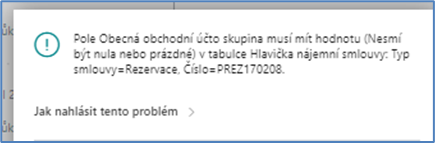
Gen. Bus. Posting Group
-
If it is not filled in automatically from the specified tenant or manually, the following message will be displayed:
-
-
Tenant No.
-
If it is not filled in automatically from the entered tenant or manually, the message will be displayed: "Tenant or payer is not entered!"
-
-
-
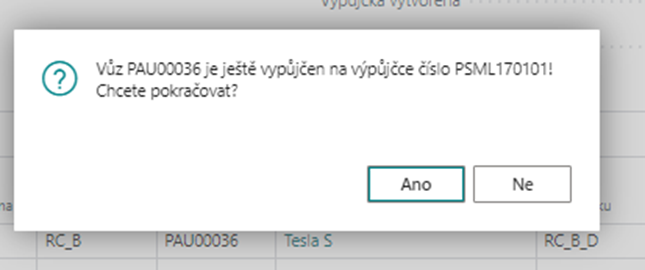
After these checks, it will be checked whether the selected vehicle is not on any other unfinished rental. If the vehicle has not yet completed the rental (the rental is not in status = Done), the system will show a warning message:
-
If the user clicks No, the loan will remain in the status New without Registration.
-
If the user clicks Yes, the reservation is registered and a detailed contract entry is created
-
-
detailed entry is created as Item Type = Reservation and Active = Yes and blocks the selected vehicle for the next reservation/rental, if the vehicle is entered
-
A reservation cannot be deleted, it can only be cancelled
The reservation status changes to Issued.
In the vehicle utilization, the vehicle will be seen for the given dates as reserved or with the "-" sign
Registration can also be done on the booking row by changing the value of the Forwarded field to Yes.
After clicking on Yes in the displayed message, the reservation will be registered: "Do you want to issue/register the card?"
The current status on the vehicle card will be displayed as Reservation.