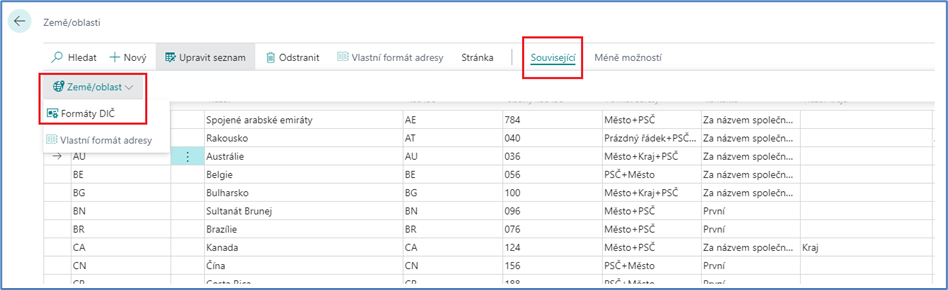
The Countries and Regions code list is used to set up countries and/or territories, which are then assigned to the address card. On the vendor card, country/region codes are used in conjunction with INTRASTAT reporting and recapitulative reporting.
In the code list, it is possible to set the format and/or location of the address, etc.
Field:
-
Code
-
A unique country or territory code. It is recommended to set it in such a way that it is clear which country it is. It can be entered in text, numeric form, or a combination of text and number with a maximum length of 10 characters.
-
-
Name
-
Country/Region Name
-
-
ISO Code
-
A unique country or territory code. It can be entered in text, numeric form, or a combination of text and number with a maximum length of 10 characters.
-
-
ISO Numeric Code
-
Specifies a three-digit code number defined in the ISO 3166-1 standard.
-
-
Address Format
-
Specifies the format of the address that is displayed on external documents. You can link the address format and the country/region code so that external documents that are based on cards or documents with that country/region code use the format of the specified address. Note: If the Province field is filled in, then the county will be printed above the country/region unless you select City + County + Post Code.
-
Choice:
-
Postcode+ City
-
City + Post Code
-
City +County +Post Code
-
Blank Line + Post Code + City
-
Own
-
On the Related button and Custom Address Format tab,
-
In the ID field, the user selects a field to set the display of their own address
-
-
-
-
-
Contact Address Format
-
Specifies where to Contact Name display in mailing addresses.
-
format of the address of the contacts, according to the assigned Country or Territory code. There are 3 options to choose from:
-
First
-
After the company name
-
Last
-
-
-
Country Name
-
Specifies the name of the county
-
-
EU Country/Region Code
-
Specifies the EU code for the country/region you are doing business with
-
-
Intrastat Code
-
Specifies the INTRASTAT code for the country/region that you are doing business with
-
-
VAT Scheme
-
Specifies the national entity that assigns the VAT number for the country/region in conjunction with electronic document sending.
-
In the Countries and Territories code list, it is also possible to set the display format of the VAT registration number for individual countries via the button in the ribbon: