
Creating an individual insurance contract that does not enter into financing payments is possible manually or using a wizard (if set up on the financing template).
On the Financed Object card, the user opens Elements -> Insurance Contracts. The system opens the list of insurance contracts
Then he presses the button New Individual Contract. Once the function is confirmed, the system will check if the financing template is filled in on the financing contract. If:
-
Isn't Completed Financing Template No.
-
The Framework Agreement Types opens, where the user selects which type of framework agreement they want to use (filter to Insurance Type = Individual):
-
After confirmation with the button OK The system creates a new insurance contract and opens the individual insurance contract card with added data from the financing contract, object, etc.
The user then selects the data needed for insurance:
-
Insurance Company No.
-
Insurance Product No.
-
Etc.
Them Completed Financing Template No.
-
The system checks if the settings in the table are on the financing template Individual insurance of the financing template. If:
-
Not set
-
continues with the display of framework agreement types (point above)
-
-
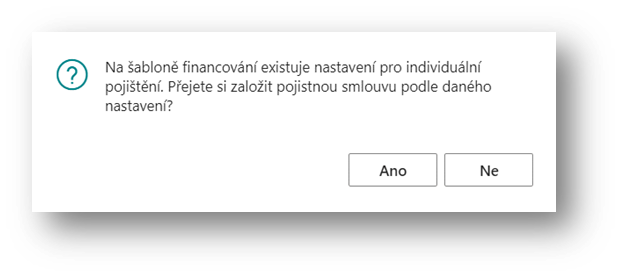
Is the setting
-
The system displays a decision message
-
The user confirms:
-
No – the system continues by displaying the types of framework agreement
-
Yes – the system displays the first step of the Individual Insurance Contract Wizard
-
-
-
From the subject and the financing contract, the system has set the data into the fields:
-
Financing Contract No.
-
Financed Object No.
-
Customer No.
-
Expected Handover Date
-
Expected Termination Date
In the "Individual Insurance" section, based on the "Financing Template Number" in the contract/calculation header, the system selects the individual insurance settings – i.e. the preset insurance into three groups according to the type of insurance:
-
Car Insurance
-
Property insurance (accident, machinery)
-
Other insurance – for additional, other insurance
By clicking on the calculated field, the user opens a form with an overview for the given type of insurance.
The system offered third-party insurance according to the settings on the financing template. The user can select only one third-party insurance.
If the user stiffens the field Selected, the system checks whether all fields are filled in on the line: insurance company number, product number, framework agreement type. If the fields are not filled in, an error is reported.
The user selects the selected insurance.
In the same way, the user selects property and other insurance.
After selecting the insurance rates for the additional insurance, the user closes the selection with the button Close and on the initial form, the wizard selects the Another.
If insurance is marked as mandatory on the template, the system checks according to the settings whether the insurance has been selected. Depending on the setting in the Check for Insurance Contracts Existence field, whether it is mandatory, requires confirmation, or not mandatory:
If they do not select insurance that is mandatory or requires confirmation, a user notification or error message follows, depending on the settings on the product or template (Detailed in the document Financing Products and Services Pricelists)
In case it is set:
-
Confirmation
-
This is followed by a notification with a decision option where it allows the user to continue: "Mandatory insurance has not been selected, do you still want to continue?"
-
-
Mandatory
-
This is followed by a blocking message: "Insurance XX is mandatory."
-
In case the product/template is set to Mandatory The system will automatically tick the box Mandatory = Yes. If the user wants to delete such an insurance contract after creating it, the system will ask if the user really wants to continue.
If the required insurance has been selected, the system opens a form with an overview of the prepared insurance.
Button Finish The user enters a command to create insurance contracts.
Upon completion, the system will display a message that insurance contracts have been created.
An overview of individual insurance contracts is available from the Financing Contract Card Elements -> Overview of Individual Insurance Contracts.
Once confirmed, the list of individual insurance contracts will open.