
INSURANCE Report Definition List
Reports for reporting to the insurance company are user-definable in the Insurance Report Definition Overview.
AN overview of the definition of insurance reports can be displayed:
-
Manual Setup / Insurance Report Definition List
-
By searching through a magnifying glass
To create a new definition, select New from THE List of insurance report definitions. The system displays a new Insurance Report Definition Card.
Insurance Report Definition Card
The insurance report definition card has two parts:
-
Header with bookmark General for defining report parameters
-
Subform insurance Report Definition for defining individual report columns.
GENERAL Tab
Field:
-
CODETHE
-
USER enters a unique report code, max. number of characters 10
-
-
Description
-
The system will fill in the text from the field Description from the entered Insurance Reporting Group Code
-
THE user can change the
-
-
Report Type:
-
THE user selects the report type for which he defines the structure:
-
ADDITIONS,
-
disposals,
-
Changes,
-
Prolongation,
-
Keep,
-
Insurance Portfolio
-
-
-
insurance Company No.
-
THE user selects the insurance company of the report from the Insurance Company List
-
-
insurance Product No.
-
THE user selects a product from the Insurance Company Product List
-
Reports must be defined for all insurance company products except for add-ons that are reported with the main product (usually KASKO). For additions reported additionally (creation of an insurance contract for an add-on during the validity of the main insurance contract) it is possible to create a separate report definition.
-
-
framewok Agreement No.
-
THE user selects the insurance framework contract from the Insurance Framework Contracts overview, filtered to the specified insurance company and product
-
THE framework agreement is the basic key for reporting
-
-
INSURANCE Reporting Group Code
-
USER selects code from Insurance Reporting Group overview
-
The reporting set allows you to create different reporting groups
-
Insurance Report Definition
Field:
-
COLUMN CodeThe
-
USER selects the column designation, max. 10 characters
-
Marking only for the report definition
-
-
Column Order:
-
THE user numbers the order in which the system sorts the columns for output
-
-
Value Type
-
THE user selects the source from the options
-
Database
-
defining a Field Value from a Table in a Database
-
-
Constant
-
fixed value
-
-
Calculation
-
-
-
Constant (Constant)
-
THE user enters the value of a constant when the value of the field Value Type = Constant
-
-
table No.
-
THE user selects a table number from the database if Value Type = Database
-
-
TABLE
-
NameFills in the table name according to the selected table number
-
Possible tables to choose from:
|
OBJECT ID |
OBJECT Name |
Object Caption |
|
18 |
Customer |
CUSTOMER |
|
4026397 |
API Financing Contract Header |
Financing Contract Header |
|
4026560 |
API Financed Object |
FINANCED Object |
|
4027010 |
API Insurance Product Variant |
Insurance Product Variant |
|
4027050 |
API Insurance Rate |
Insurance Rate |
|
4027100 |
API Insurance Contract |
Insurance Contract |
|
4027122 |
API Insurance Statement Line |
insurance Statement Line |
-
field No.
-
THE user selects the field number whose value is to be reported to the insurance company from the table selected in the field table No.
-
-
FIELD Name:
-
Fills in the field name according to the selected field number
-
-
Custom Field Name:
-
THE user enters a description that they want to use as the column name in the report. If the field is not filled in, the system will use the name of the field from the table in the resulting report
-
-
Change Trekking:
-
Marking of fields (columns) for which changes need to be tracked and reported to the insurance company
-
Fields are defined for Report Type = Change
-
When an increment report is issued, the system saves the value of fields flagged With Track Change to the internal table (4027120). If there is a change in any of the fields, the insurance contract will be included in the change report. By issuing a statement of changes, new field values are added to the written internal table.
-
WHEN reporting changes, it then checks the current data with an archived monitored field. If any of the monitored fields has been changed, the insurance contract is included in the report and the contents of the report are stored in an internal table for the next comparison.
-
-
Fixed Part ChangesThe
-
USER ticks the field that he wants to always include in the single-line change report
-
Unmarked fields will be in the single-line change report only if they are marked Track change and there has been a change in the field during the reporting period
-
-
Extension (Prolongation)
-
THE user ticks the field according to which the system will suggest insurance contracts for Report Type = Extension. IN this case, the field is Valid To z Insurance Contracts.
-
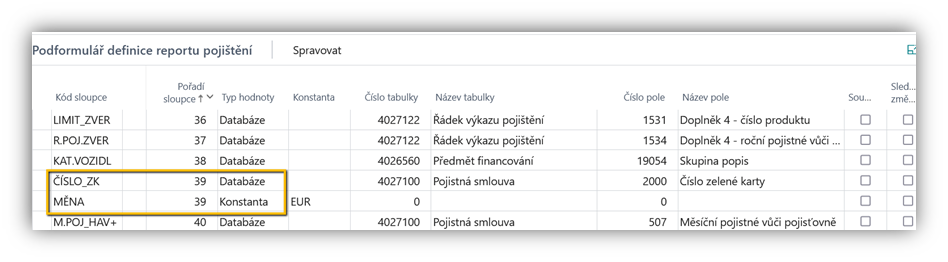
Please note:
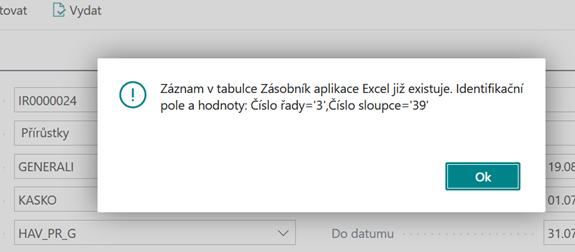
IF the user makes a mistake in the report definition - he maps multiple columns with the same column order, the system displays an error message to the user during export:
"THE record in the Excel Stack table already exists. Identification fields and values: Series number = X, Column number = Y"
Forced Text Format
There was a problem with exporting the customer's phone number to the insurance report. Although the database field is text, the format of the phone number did not match when exported to Excel.
IN this case, it is possible to set a forced text format in the insurance report definition.
To Field XLS format you need to type "@". Then, when you export to Excel, the field no longer matches.
Copying the Insurance Report Definition Card
It is possible to create an insurance report definition by copying an existing definition.
The function can be run from the overview or from the insurance report definition card.
When the function is executed, the system displays a dialog window for entering the definition code for a new report that will be created by copying.
Function The Copy copies both the header and line portions.
Supplement with a link to the product
Supplementary insurance is required by the insurance company to be reported together with the main product. This needs to be taken into account in the product definition.
THE user must specify a link to the main product on the insurance set.
On the insurance contract, the system records the link of the add-on to the insurance contract to the main product.
A maximum of 7 add-ons can be registered for one main product. The order of the addition in the report is defined by the user on the insurance company product for the add-on.
On the main product report card, the additions can be seen in the Addition 1 to Addition 7 fields and the relevant fields for the add-ons.
Add-on fields are calculated from linked insurance contracts to statement lines. They can be used in a statement for an insurance company. In the report definition for the main product, you need to add a definition for the columns for the add-ons.
AS a source table, the user selects 4027122 – insurance Statement Line and a field for add-ons that he wants to report (Addition 1 – Rate, Annual Premium, Monthly Premium).
After reporting additions (or delisting disposals), the system will then write the date of reporting (or deregistration) to both the insurance contract with the main product and the insurance contract with the add-on.
Additional Insurance Report Retrospectively
IN the event that additional insurance, e.g. for Kask, is arranged retrospectively – at a time when the main insurance has already been announced.
Add-ons are normally exported only as a column to the main insurance to which they are linked.
Since the main insurance policy has already been reported, only the add-on needs to be reported. There are two ways to sign up for an add-on:
-
IN the main insurance policy increments report, the insurance contract number can be entered into the line manually, not by the function Suggest Lines (Suggest Line).
-
Since the fields for comparing changes are stored when reporting additions, it is also necessary to prepare a change report with the product, the framework agreement and the additional insurance package for the additional insurance that is reported separately.
-
There must be a reporting set (the same as the main insurance) on the supplemental insurance set.
-
-
Define Additions Report for Add-ons Separately
-
only insurance contracts for add-ons that were added additionally, i.e. when the main insurance contract has already been reported (field Insurance Company Check-in date is filled in)
-
WITH this method, it is important to process the statement of additions only after the statement of additions to the main insurance has been released (the system will add the dates of reporting to the insurance company), so that insurance contracts for additions do not fall into the report for additions, which were taken out together with the insurance contract of the main product (same validity).
-