
Field:
-
Customer Credit Limit No.
-
The user can select the Customer Frame No. to which the agreement belongs
-
It is possible to choose from the limits:
-
Customer No.=same as in contract
-
Product Type Filter=empty or same as contract
-
Limit Remaining Amount>=0 (i.e. the limit has not been exhausted yet)
-
Limit Status=Active
-
-
For a description of the framework, see Kreditní rámce zákazníka
-
-
Salesperson Code
-
Completes the system when creating a calculation/contract from the wizard
-
The user can enter/change the Code of the salesperson (merchant) who created the contract
-
When the value is changed, the system will update the value of global dimension 1 (by default, we set Cost_Center Code)
-
-
Salesperson's Name
-
It will be tightened automatically according to the Salesperson Code
-
-
Branch
-
The system will add the Branch Code from the Calc./Contract Creation Wizard
-
The user can change the location
-
-
Sales Channel
-
The user selects the sales channel through which the deal (contract) was concluded from a predefined code list of values
-
-
Agent No.
-
In this field, the user selects the number of the contact (company or person) who mediated the contract
-
-
Administrator
-
A user can enter the Code of the contract manager who manages the contract
-
-
Number of Contracts
-
Will the system automatically fill in the value "1" when creating a calculation/contract
-
The user can change if he wants to create and approve another number of identical contracts from the offer
-
Editable only if the field Mandatory Quote Approval = N in User Settings and on Detailed Contract Status is flag Calculation = A
-
-
Approval No.
-
The system displays the approval number from the Approval History table for a given quote from a record with the flag Active = A
-
-
Approver Name
-
The system displays the value of the Approver Name field from the Approval History table of the offer from the record with the flag Active = A
-
-
Approval Status
-
The system displays the value of the Approval Status field from the Approval History table for the quote from the record with the flag Active = A
-
-
Approver ID
-
The user can select the entity that approved the financing contract. Selects the value from the approvers list
-
Editable only if field Mandatory Quote Approval = No in User Settings
-
When activating a contract, the field must be filled in
-
-
Approval Protocol ID
-
The filling of the fields depends on the completion of the Customer Frame No. field
-
The user enters the ID of the approval protocol, on the basis of which the contract was approved, or completes the system automatically from the field of the same name from the approved customer framework, if the Customer Frame No. field is filled in
-
Editable only if field Mandatory Quote Approval = No in User Settings
-
-
Approval Date
-
Empty by default. To be completed by the user after the offer has been approved by the internal approver (risk management)
-
When activating a contract, the field must be filled in
-
-
Contact Rating on Signing Contract
-
To be entered by the user after entering the Contract Signing Date. When clicked, the Contact Rating opens with filters:
-
Customer's Contact No. from Contract
-
Rating Date<=Contract Signing Date<=Rating Valid Until
-
Contract Rating=A
-
-
If the contract signing date is not entered and the user tries to select a rating, the OC displays an error message:
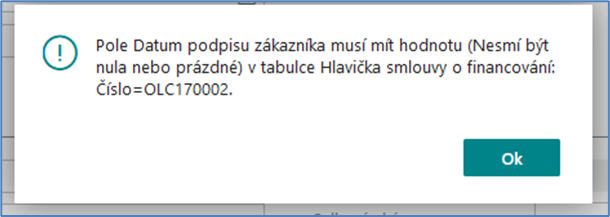
-
If the user subsequently deletes the date of signing the contract, the OC will also delete the rating when signing the contract
-
-
Rating Description on Signing the Contract
-
Fills in OC automatically
-
-
Last Contact Rating
-
The OC will automatically fill in the last rating of the contact in the sequence when opening the contract form (or updating via F5) if:
-
A customer's contact number is entered in the contract
-
The Contract Signing Date is specified in the contract
-
It's a variable, it's not a physical field in a table.
-
-
The update (recalculation) takes place when the contract form is opened (or updated via F5)
-
-
Last Rating Description
-
Fills in OC automatically
-
-
Object Handover Protocol Delivery Date
-
The user shall mark the date when the protocol on handing over the financed object to the customer was delivered to the leasing company
-
-
Date of transfer to effective
-
The system will automatically fill in the contract activation date in this field
-
The field is not user-editable
-
-
Converted into effective
-
The system automatically fills in this field with the ID of the user who activated the agreement.
-
The field is not user-editable
-
-
Created on
-
The system will automatically fill in the date of creation of the financing contract
-
The field is not user-editable
-
-
Created by
-
The system will automatically fill in the ID of the user who created the contract
-
The field is not user-editable
-