
Insurance Ensure Bases
Insurance Company Products / Other Terms and Conditions / Security Basics
On the "Insurance Company Product" tab, the user can define the security required for a given type of insurance company and product. There may be several security per product, and some of them may be mandatory. The default security consideration can be determined by the interval for which it applies.
Security refers to property insurance, i.e. the type of product Property.
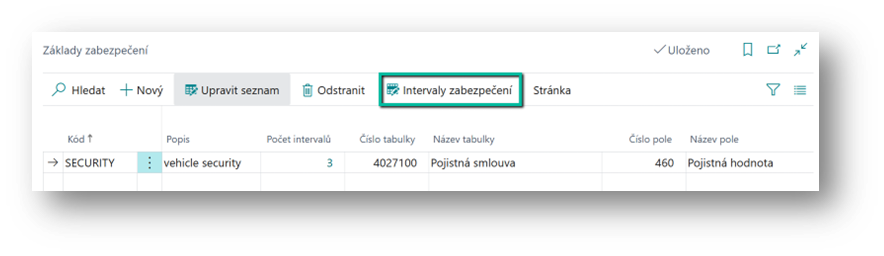
First, the user must determine what the security base is.
Via the Security Bases icon, the user fills in the fields
-
Code (Code)
-
A user chooses a security base code
-
-
Description (Description)
-
The user fills in the description
-
-
Table No. (Table No.)
-
The user selects a table to determine the basis (insurance contract or financing contract header)
-
-
Field No. (Field No.)
-
Here, the user selects a field that is the basis for security (most often the base is the sum insured).
-
Ensure Interval
Insurance Company Products / Other Conditions / Ensure Intervals
Subsequently, the user specifies the security intervals:
-
The security interval can be specified by the user according to the parameters of the financed object:
-
Object Category (Object Category)commodity (Commodity Code)group (Group)subgroup (Subgroup), Object Type (Type)make (Make Code), Model Line (Model Line Code)model (Model), Model Type (Model Type)
-
If a key parameter is empty, it applies to all options for that parameter. If a parameter is specified, it applies only to that key.
For a given code and a description of the base, the user enters
-
From Value (From Value)
-
The user enters the lower limit of the interval. If the field is empty, the interval is not constrained from the bottom.
-
-
To Value (To Value)
-
The user specifies the upper limit of the interval. If the field is empty, the interval is not limited from above.
-
-
Number of Security Devices (Number Of Security Devices)
-
The user enters the number of security devices required
-
-
Number of Mandatory Safeguards (Number Of Mandatory Devices)
-
This is a calculated field from the security definition. The filter is set to Mandatory Security.
-
To specify security devices, the user uses the Security Definition button.
Security Definitions
The user specifies the device for the given security. For each security, the user determines whether this device is mandatory.