
RC OneCore – Financing (OneCore Financing)
In RC OneCore – Financing, there are options for managing financing contracts without services – a detailed description of each option is described in the relevant documents (mainly Smlouva bez služeb and Změny smlouvy etc.).
In practice, it is used, for example, in the leasing contract report department.
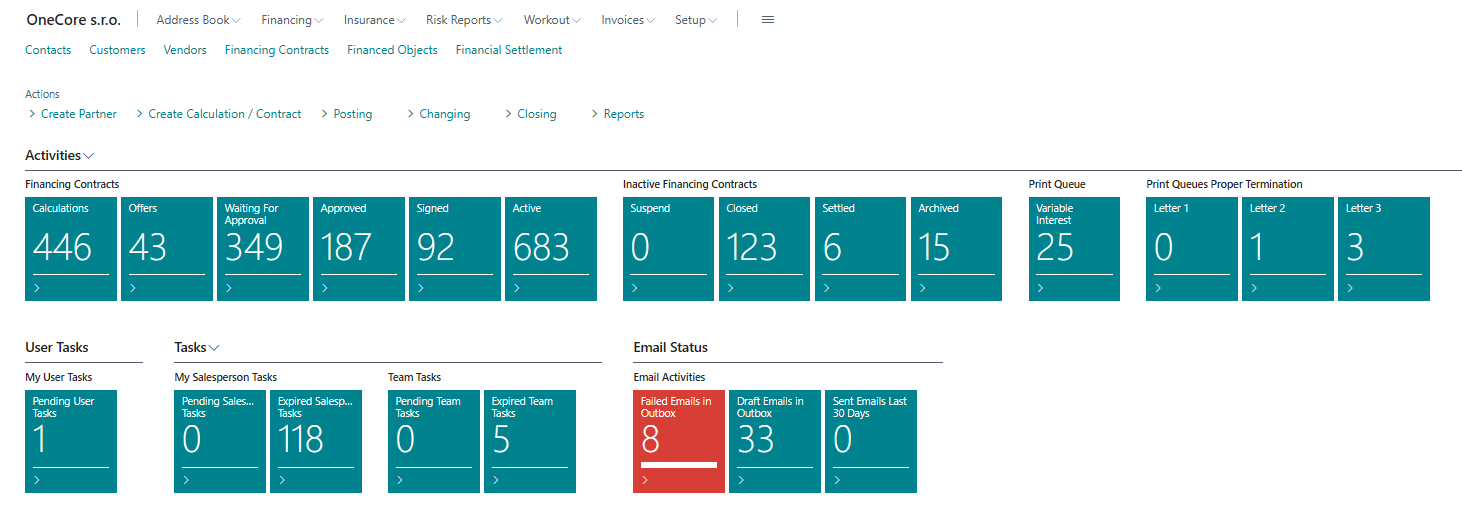
Cues according to the original MS solution display the number of records, but if the number of records is more than 1000, they display the value 999+. Therefore, some of them have been modified to show the actual number - Calculations, Offers, Waiting for Approval, Approved, Signed, Active, Suspend (iba kvoli jednotosti), Closed, Settled, Archived, Contract Interest Recalculation, Letter VAT.
Description of the tiles to view the tasks:
-
Pending User Tasks:
-
a list of pending tasks that are assigned to the logged-in user
-
. List Task View Filter
-
% Completed <>100
-
Pending Tasks = Yes
-
-
-
-
Pending Salesperson Tasks:
-
A list of pending tasks that are assigned to the logged-in user but as a salesperson.
-
User must be entered as a salesperson in the Salesperson/Purchaser table
-
To identify a user as a salesperson, the value of the Salesperson Code from the Salesperson/Purchaser table must be entered in the Salesperson/Purchaser Code field in the "User Settings" listTask
-
display filter
-
Salesperson Code = Salesperson Code of the logged-in user according to the setting in the "User Settings"
-
listEnd date = Today's date and higher dates such as today's date
-
System Task Type = Organizer
-
Closed = No
-
-
-
-
-
Expired Salesperson Tasks:
-
A list of post-due tasks that are assigned to the logged-in user but as a salesperson.
-
The user must be entered as a salesperson in the Salesperson/Purchaser table
-
To identify a user as a salesperson, the value of the Salesperson Code from the Salesperson/Purchaser table must be entered in the Salesperson/Purchaser Code field in the "User Settings" listTask
-
display filter
-
Salesperson Code = Salesperson Code of the logged-in user according to the setting in the "User Settings"
-
listEnd date = lower dates such as today's date
-
System Task Type = Organizer
-
Closed = No
-
-
-
-
-
Pending Team Tasks
-
: a list of pending tasks that are assigned to teams in which the logged-in user is specified as a salesperson:
-
The user must be entered as a salesperson in the Salesperson/Purchaser table
-
To identify a user as a salesperson, the value of the Salesperson Code from the Salesperson/Purchaser table must be entered in the Salesperson/Purchaser Code field in the "User Settings"
-
listThe user as a salesperson is entered in the team as a salesperson in the Salesperson Code
-
field Task display filter
-
Salesperson code <> from the salesperson code of the logged-in user according to the settings in the "User Settings"
-
listTeam code = filter of all teams in which the logged-in user as a salesperson occurs End
-
Date = Today's Date and higher dates such as today's date
-
System Task Type = Team
-
Closed = No
-
-
-
-
-
Expired Team Tasks
-
a list of tasks after the due date tasks that are assigned to teams in which the logged-in user is specified as a salesperson
-
The user must be specified as a salesperson in the Salespeople / Purchasers table
-
To identify a user as a seller, the value of the Salesperson Code from the Salesperson/Purchaser table must be entered in the Salesperson/Purchaser Code field in the "User Settings" list
-
The user as a salesperson is entered in the team as a salesperson in the Salesperson Code field
-
List Task View Filter
-
The Salesperson Code <> from the Salesperson Code of the logged-in user according to the settings in the "User Settings" list
-
Team Code = filter of all teams in which the logged-in user as a salesperson appears
-
End date = lower dates such as today's date
-
System Job Type = Team
-
Closed = No
-
-
-
-
Description of tiles for displaying email activities in OC
-
Failed emails in Outbox.emails
-
where the sender is a logged-in user, which were not sent from OC due to an error (e.g. the function for sending emails is not set)
-
the error can be displayed for each row of the list by the user via the "Show error" button
-
-
Draft Emails in OutboxA
-
list of emails that the user has prepared but not sent and saved as Draft
-
-
Sent Emails Last 30 Days:
-
a list of emails sent by the logged-in user in the last 30 days from the set date. By default, the date is set to the current date.
-