
RC OneCore – Funding
In RC Funding, there are options for Funding functionalities (refinancing of the leasing company through loans and tranches) – detailed description is in Funding
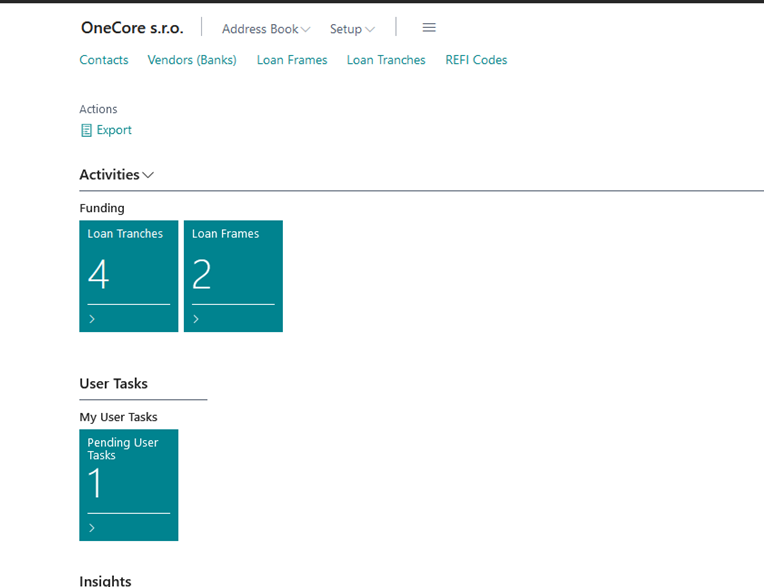

Description of the tiles to view the tasks:
-
Pending User Tasks
-
A list of pending tasks that are assigned to the logged-in user.
-
List Task View Filter
-
% Completed <>100
-
Pending Jobs = Yes
-
-
-
-
Pending Salesperson Tasks
-
A list of pending tasks that are assigned to the signed-in user, but as a salesperson.
-
The user must be specified as a salesperson in the Salespeople / Purchasers table
-
To identify a user as a seller, the value of the Salesperson Code from the Salesperson/Purchaser table must be entered in the Salesperson/Purchaser Code field in the "User Settings" list
-
List Task View Filter
-
Salesperson Code = Salesperson Code of the logged-in user according to the settings in the "User Settings" list
-
End Date = Today's date and higher dates such as today's date
-
System Job Type = Organizer
-
Closed = No
-
-
-
-
-
Expired Salesperson Tasks
-
A list of tasks after the due date of tasks that are assigned to the logged-in user but as a salesperson.
-
The user must be specified as a salesperson in the Salespeople / Purchasers table
-
To identify a user as a seller, the value of the Salesperson Code from the Salesperson/Purchaser table must be entered in the Salesperson/Purchaser Code field in the "User Settings" list
-
List Task View Filter
-
Salesperson Code = Salesperson Code of the logged-in user according to the settings in the "User Settings" list
-
End date = lower dates such as today's date
-
System Job Type = Organizer
-
Closed = No
-
-
-
-
-
Pending Team Tasks
-
A list of pending tasks that are assigned to teams in which the signed-in user is specified as a salesperson.
-
The user must be specified as a salesperson in the Salespeople / Purchasers table
-
To identify a user as a seller, the value of the Salesperson Code from the Salesperson/Purchaser table must be entered in the Salesperson/Purchaser Code field in the "User Settings" list
-
The user as a salesperson is entered in the team as a salesperson in the Salesperson Code field
-
List Task View Filter
-
The Salesperson Code <> from the Salesperson Code of the logged-in user according to the settings in the "User Settings" list
-
Team Code = filter of all teams in which the logged-in user as a salesperson appears
-
End Date = Today's date and higher dates such as today's date
-
System Job Type = Team
-
Closed = No
-
-
-
-
-
Expired Team Tasks
-
A list of tasks after the due date tasks that are assigned to teams in which the logged-in user is specified as a salesperson
-
The user must be specified as a salesperson in the Salespeople / Purchasers table
-
To identify a user as a seller, the value of the Salesperson Code from the Salesperson/Purchaser table must be entered in the Salesperson/Purchaser Code field in the "User Settings" list
-
The user as a salesperson is entered in the team as a salesperson in the Salesperson Code field
-
List Task View Filter
-
The Salesperson Code <> from the Salesperson Code of the logged-in user according to the settings in the "User Settings" list
-
Team Code = filter of all teams in which the logged-in user as a salesperson appears
-
End date = lower dates such as today's date
-
System Job Type = Team
-
Closed = No
-
-
-
-
Description of tiles for displaying email activities in OC
-
Failed Emails in Outbox
-
emails where the sender is a logged-in user, which were not sent from OC due to an error (e.g. the function for sending emails is not set)
-
The error can be displayed by the user for each row of the list via the "Show error" button
-
-
Draft Emails in Outbox
-
a list of emails that the user has prepared but not sent and saved as Draft
-
-
Sent Emails Last 30 Days
-
A list of emails sent by the logged-in user in the last 30 days from the set date. By default, the date is set to the current date.
-