
Microsoft RC Accountant CZ
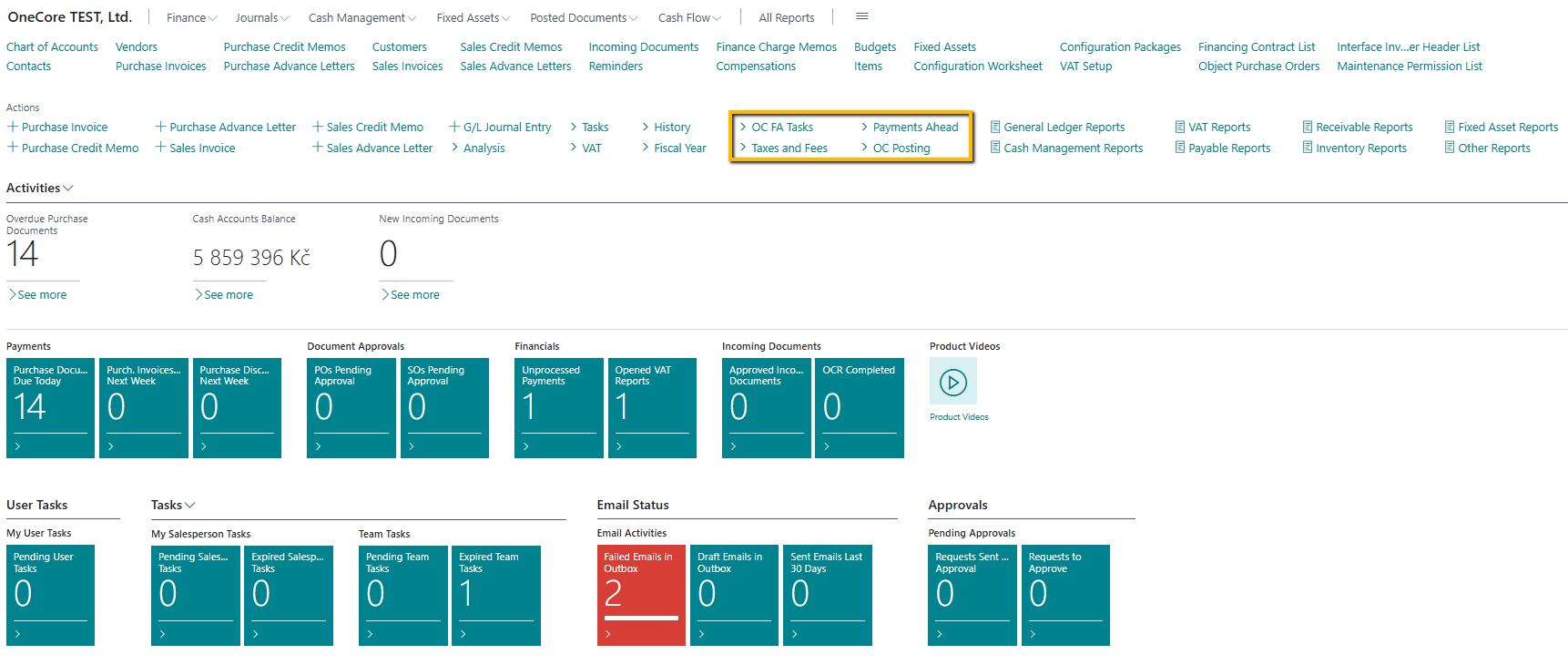
In MS RC Accountant CZ there are options for:
-
Processing of mass tasks for fixed assets in the Actions menu → FA OC Jobs. A detailed description of each option is described in the relevant documents, especially in the Majetek :
-
Fixed Asset Error Log (FA)
-
Build Fixed Asset Cards
-
Revision of data on the FA Card
-
Interruption of Accounting Depreciations
-
Transfer to STOCK and Dispose off the FA Card
-
Calculate Depreciation
-
-
Road tax processing and calculation of TV and radio fees in the offer Events → Taxes & Fees. A detailed description of each option is described in the relevant documents, especially in the Silniční daň and Rozhlasové a televizní poplatky :
-
Road Tax
-
Calculation of Radio and TV Fees
-
-
Advance payment processing in the Actions menu → Prepayment. A detailed description of each option is described in the relevant documents, especially in the Platby předem :
-
Payments Ahead List
-
Payment Journals
-
Apply Customer Ledger Entries
-
Generate Tax Documents and Credit Memos for Payments Ahead
-
-
management of all financing contracts with and without services in the Events → offer OC Posting. A detailed description of each option is described in the relevant documents (mainly Smlouva se službami , Smlouva bez služeb):
-
Batch contract posting setup
-
Batch payment posting (planner without services)
-
Post financing payment (without services)
-
Cancel financing payments
-
Batch - CI and accrual posting
-
Post financing payment (with services)
-
Post billing credit memos
-
Posting error log
-
Mass reinvoice maintenance
-
Maintenance mass invoice log
-
Mass invoicing fuel cards
-
Fuel card mass invoicing log
-
Bonus invoicing.
-
Description of the tiles added to this RC:
-
Pending User Tasks
-
A list of pending tasks that are assigned to the logged-in user.
-
List Task View Filter
-
% Completed <>100
-
Pending Jobs = Yes
-
-
-
-
Pending Salesperson Tasks
-
A list of pending tasks that are assigned to the signed-in user, but as a salesperson.
-
The user must be specified as a salesperson in the Salespeople / Purchasers table
-
To identify a user as a seller, the value of the Salesperson Code from the Salesperson/Purchaser table must be entered in the Salesperson/Purchaser Code field in the "User Settings" list
-
List Task View Filter
-
Salesperson Code = Salesperson Code of the logged-in user according to the settings in the "User Settings" list
-
End Date = Today's date and higher dates such as today's date
-
System Job Type = Organizer
-
Closed = No
-
-
-
-
-
Expired Salesperson Tasks
-
A list of tasks after the due date of tasks that are assigned to the logged-in user but as a salesperson.
-
The user must be specified as a salesperson in the Salespeople / Purchasers table
-
To identify a user as a seller, the value of the Salesperson Code from the Salesperson/Purchaser table must be entered in the Salesperson/Purchaser Code field in the "User Settings" list
-
List Task View Filter
-
Salesperson Code = Salesperson Code of the logged-in user according to the settings in the "User Settings" list
-
End date = lower dates such as today's date
-
System Job Type = Organizer
-
Closed = No
-
-
-
-
-
Pending Team Tasks
-
A list of pending tasks that are assigned to teams in which the signed-in user is specified as a salesperson.
-
The user must be specified as a salesperson in the Salespeople / Purchasers table
-
To identify a user as a seller, the value of the Salesperson Code from the Salesperson/Purchaser table must be entered in the Salesperson/Purchaser Code field in the "User Settings" list
-
The user as a salesperson is entered in the team as a salesperson in the Salesperson Code field
-
List Task View Filter
-
The Salesperson Code <> from the Salesperson Code of the logged-in user according to the settings in the "User Settings" list
-
Team Code = filter of all teams in which the logged-in user as a salesperson appears
-
End Date = Today's date and higher dates such as today's date
-
System Job Type = Team
-
Closed = No
-
-
-
-
-
Expired Team Tasks
-
A list of tasks after the due date tasks that are assigned to teams in which the logged-in user is specified as a salesperson
-
The user must be specified as a salesperson in the Salespeople / Purchasers table
-
To identify a user as a seller, the value of the Salesperson Code from the Salesperson/Purchaser table must be entered in the Salesperson/Purchaser Code field in the "User Settings" list
-
The user as a salesperson is entered in the team as a salesperson in the Salesperson Code field
-
List Task View Filter
-
The Salesperson Code <> from the Salesperson Code of the logged-in user according to the settings in the "User Settings" list
-
Team Code = filter of all teams in which the logged-in user as a salesperson appears
-
End date = lower dates such as today's date
-
System Job Type = Team
-
Closed = No
-
-
-
-
Description of the added tiles for displaying email activities in OC:
-
Failed Emails in Outbox
-
emails where the sender is a logged-in user, which were not sent from OC due to an error (e.g. the function for sending emails is not set)
-
The error can be displayed by the user for each row of the list via the "Show error" button
-
-
Draft Emails in Outbox
-
a list of emails that the user has prepared but not sent and saved as Draft
-
-
Sent Emails Last 30 Days
-
A list of emails sent by the logged-in user in the last 30 days from the set date. By default, the date is set to the current date.
-