
-
Customer Credit Limit No.
-
It is used to assign a calculation/contract to a specific customer framework
-
It is possible to choose from the limits:
-
Customer No.=same as in contract
-
Product Type Filter=empty or same as contract
-
Limit Remaining Amount>=0 (i.e. the limit has not been exhausted yet)
-
Limit Status=Active
-
-
-
Salesperson Code
-
Completes the system when creating a calculation/contract from the wizard
-
The user can enter/change the Code of the salesperson (merchant) who created the contract
-
When the value is changed, the system will update the value of global dimension 1 (by default, we set Cost_Center Code)
-
-
Salesperson's Name
-
It will be tightened automatically according to the Salesperson Code
-
-
Branch
-
The system will add the Branch Code from the Calc./Contract Creation Wizard
-
The user can change the location
-
-
Sales Channel
-
The user selects from a predefined code list of values the sales channel through which the deal (contract) was concluded
-
-
Agent No.
-
In this field, the user selects the number of the contact (company or person) who mediated the contract
-
-
Administrator
-
A user can enter the Code of the contract manager who manages the contract
-
-
Number of Contracts
-
Will the system automatically fill in the value "1" when creating a calculation/contract
-
The user can change if he wants to create and approve another number of identical contracts from the offer
-
Editable only if the field Mandatory Quote Approval = N in User Settings and on Detailed Contract Status is flag Calculation = A
-
-
Approval No.
-
The system displays the approval number from the Approval History table for a given quote from a record with the flag Active = A
-
-
Approver Name
-
The system displays the value of the Approver Name field from the Approval History table of the offer from the record with the flag Active = A
-
-
Approval Status
-
The system displays the value of the Approval Status field from the Approval History table for the quote from the record with the flag Active = A
-
-
Approver ID
-
The user can select the entity that approved the financing contract. Selects the value from the approvers list
-
editable only if field Mandatory Quote Approval = No in User Settings
-
When activating the contract, the field must be filled in
-
-
Approval Protocol ID
-
The user enters the ID of the approval protocol on the basis of which the contract was approved
-
editable only if field Mandatory Quote Approval = No in User Settings
-
-
Approval Date
-
empty by default. To be completed by the user after the offer has been approved by the internal approver (risk management)
-
When activating the contract, the field must be filled in
-
-
Contact Rating on Signing Contract
-
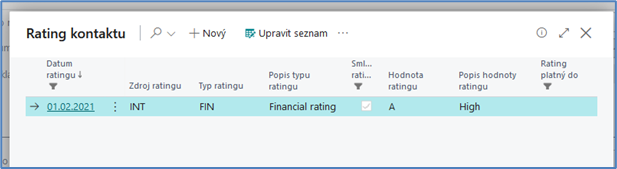
entered by the user after entering the Contract Signing Date. When clicked, the Contact Rating opens with filters:
-
Customer's Contact No. from Contract
-
Rating Date<=Contract Signing Date<=Rating Valid Until
-
Contract Rating=A
-
-
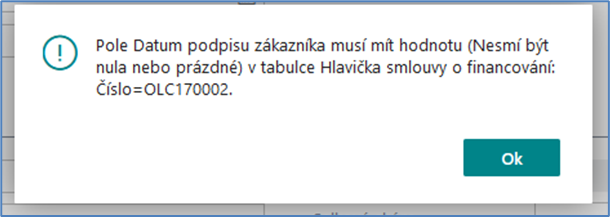
if the contract signing date is not entered and the user tries to select a rating, the OC displays an error message:
-
if the user subsequently deletes the date of signing the contract, the OC will also delete the rating when signing the contract
-
-
Rating Description on Signing the Contract
-
Fills in OC automatically
-
-
Last Contact Rating
-
The OC will automatically fill in the last rating of the contact in the sequence when opening the contract form (or updating via F5) if:
-
A customer's contact number is entered in the contract
-
The Contract Signing Date is specified in the contract
-
It's a variable, it's not a physical field in a table.
-
-
The update (recalculation) takes place when the contract form is opened (or updated via F5)
-
-
Last Rating Description
-
Fills in OC automatically
-
-
Object Handover Protocol Delivery Date
-
The User shall enter the date on which the Protocol on the handover of the Financed Object to the Customer was delivered to the Leasing Company
-
-
Date of transfer to effective
-
The system automatically fills in this field the date of activation of the contract
-
The field is not user-editable
-
-
Converted into effective
-
The system automatically fills in this field with the ID of the user who activated the contract.
-
The field is not user-editable
-
-
Created on
-
The system will automatically fill in the date of creation of the financing contract
-
The field is not user-editable
-
-
Created by
-
the system automatically fills in the ID of the user who created the contract
-
The field is not user-editable
-