
Possible Responses to Soft Errors
When importing, the system flags any soft errors found Processing Status = Error and Status Code = 400.
If Soft If the user accepts the error, he/she marks the "I accept error" field on the line and the system does not verify this line during further processing during verification.
After marking accepted errors, the user presses the button Update Rows. This changes the batch lines to "Processing Status" to New. The batch is ready to be processed. When processing, the line with the accepted error is no longer validated by the system.
If the user does not "Update rows" after marking accepted errors – the system prints an error message:
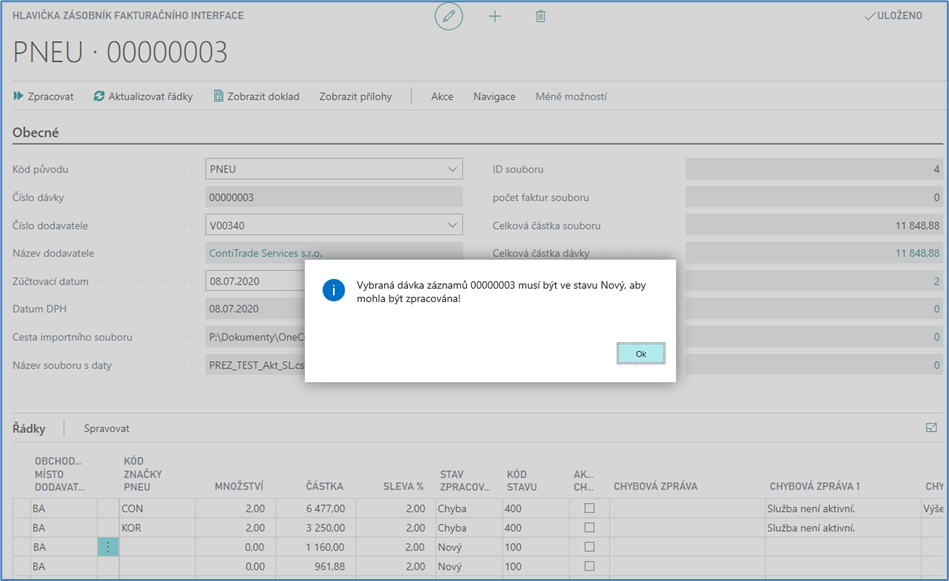
The same error message is displayed even if there are unaccepted soft errors left in the batch and the user has started processing. In this case, the system rechecks the row with the unaccepted soft error and returns the error to the "processing state".
The second option is not to accept soft mistakes.
If the user does not want to accept the soft error, he can open an overview of all soft errors via the calculated Number of Soft Errors field, save it in Excel and send the list of incorrect items to the supplier after deleting unnecessary columns.
Then, above the batch header via the delete the entire batch button, it waits for a new data sentence from the supplier.
Once a batch has been processed, it is no longer possible to delete it. Delta rows are formed during processing. However, if a hard error occurs when creating a purchase invoice, the system must allow the batch to be deleted and must also delete any difference lines created into existing allowances and entire allowances created for lines without an approval number.