
Finance Charge Memo is a possibility how to charge interest for overdue invoices to relevant customers.
Steps to use Finance Charge Memo:
-
Create Finance charge term via function Finance Charge Terms
-
standard function, some documentation can be found on MS Learn Set Up Finance Charge Terms - Business Central | Microsoft Learn (without guarantee)
-
Finance Charge Term specify how Finance Charge Memos would be calculated
-
Creation of Finance Charge term:
-
Code
-
Short code - name of charge term
-
-
Description
-
Interest Calculation
-
Open Entries
-
Closed Entries
-
All Entries
-
-
Interest Calculation Model
-
Average Daily Balance
-
Balance Due
-
-
Interest Rate
-
Fill the rate and period for this rate – e.g. 1,5 % monthly
-
-
Interest Period (days)
-
Fill the rate and period for this rate – e.g. 1,5 % monthly
-
-
Minimum Amount
-
From which amount you want to Issue Charges Memo
-
If there is 0 the system calculates charges from all due items without amount condition
-
If 10 the total of calculated charges must not be less than 10
-
-
Additional Fee
-
To add to the Finance charges also some additional fees e.g. some Issue Fees
-
Appears in the last line of prepared Charges memo
-
fill the G/L account for posting these fees
-
-
Grace Period
-
Due Date Calculation
-
Line Description
-
You can also use the placeholders that are shown in MS learn to automatically insert related values in the resulting finance charge memo text.
-
-
Post Interest
-
Post Additional Fee
-
Add. Line Fee in Interest
-
-
-
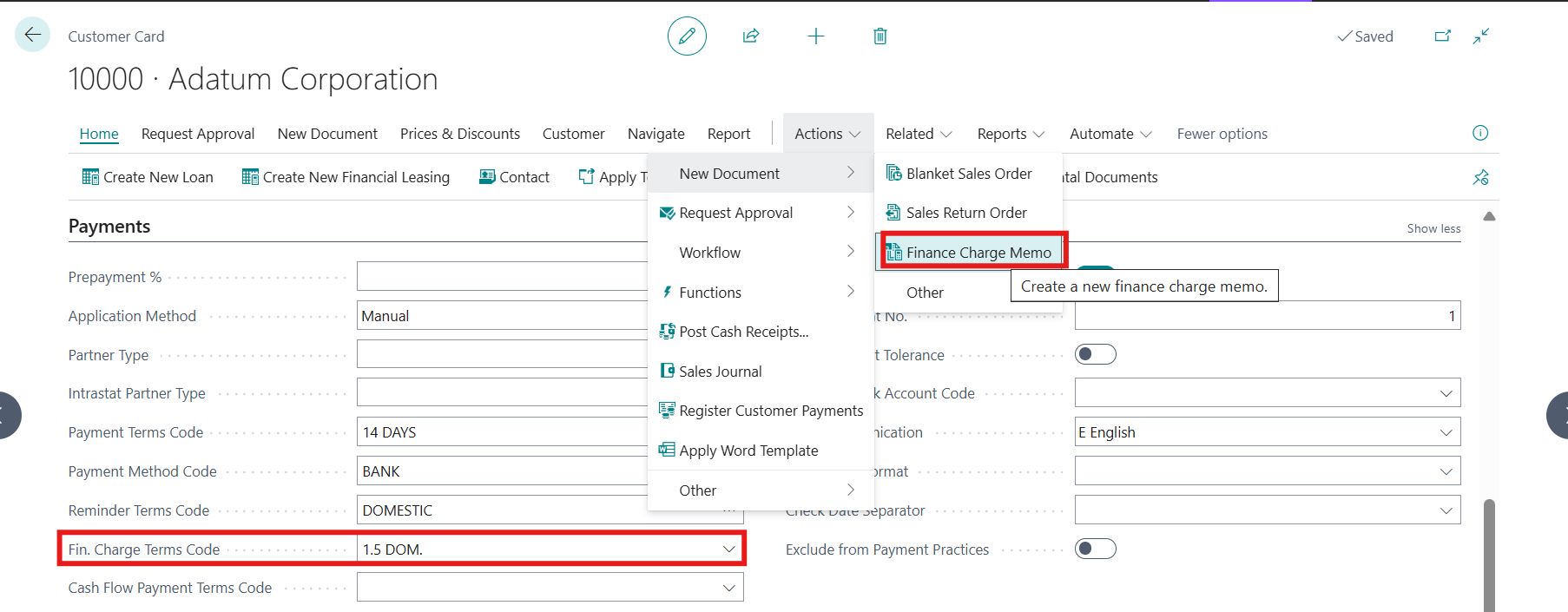
Assigned this term to all relevant customers
-
Customer Card/tab Payments/Fin. Charge Terms Code
-
-
Create Finance Charge Memo MANUALY for single Customer via Customer Card/Actions/New Document/Finance Charge Memo:
-
Finance Charge Memo has header and lines as e.g. invoice:
-
Select Posting and Document Date
-
To which date are charges calculated
-
-
Check the Finance Charge Term
-
Make sure there is assigned Fin. Charge Term Code
-
Can be changed if needed
-
-
Check the Due Date for issued Charges Memo
-
Calculate charges by batch Suggest Fin. Charge Memo Lines
-
Finance Charge Card/Actions/Function/Suggest Fin. Charge Memo Lines
-
-
The system offers items and calculate the charges according to the selected parameters and Finance Charge Term
-
Offered items could be edited or deleted from the Finance Charge Memo Lines.
-
Created Finance Charge Memo could be issued
-
Actions/Issuing/Issue
-
-
-
-
Create Finance Charge Memo AUTOMATICALLY
-
Use function Finance Charged Memo
-
Under Home is function Create Finance Charge Memo
-
It is typically used to generating finance charge memos for all customers

-
-
You can also use reminders and charge the interest in reminders.
Follow up: