
!!! When calculating the payment calendar, the system checks the completion of all posting groups in the payment calendars of services, insurance, customer (total payment calendar). If there is no posting group, the system does not calculate the payment calendar, it will display a message to the User when the contract is activated or the payment calendar is calculated. If the combination of posting groups for VAT calculation is not in the VAT posting setup, the system will not post the invoice, it will display a message to the User.
When posting an individual payment directly from a payment calendar line, the user marks the line and starts the Post function.
After you run the Post function, the system:
-
If the contract flag is Financing with Services=Y
-
The system checks the Payments Billing Method (4026635) in the Customer table (18) and then proceeds according to this value:
-
Separately for Contract
-
The user does not see a dialog window to change the Posting Date and VAT Date
-
-
Other values (Collectively for Contract, Collectively for Customer, Collectively for Customer Business Places, Collectively for Customer and Calc.Type, Collectively for Framework Agreement), the system displays a dialog box with the following fields when the function runs:
-
Posting Date
-
By default, the user can manually change the
-
-
VAT Date
-
By default, the user can manually change the
-
-
-
-
Customer-specific settings: field Payment Billing Method = Collectively per Customer
To display the dialog box:
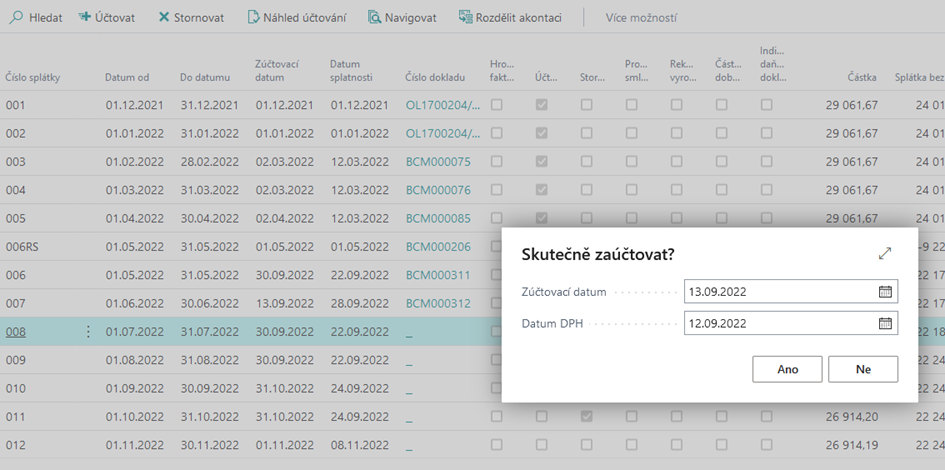
After confirmation, the system performs another check:
-
Whether the absolute value of the "Amount" field is <= than the value of the field "Tolerance for creating a document from Payment Advisor (LCY)" from "Onecore Settings" (if the contract is in a currency other than the local one, then the system will recalculate the value of the field "Tolerance for creating a document from Payment Calendar (LCY)" from "Onecore Settings" according to the current exchange rate as of the system date)
-
If YES, then the system will ask:
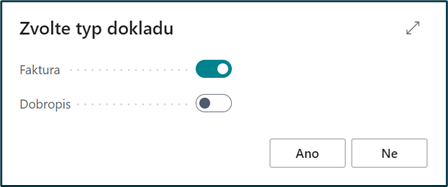
-
The default value is given according to the current value of the "Amount" field, if "Amount" is >=0 then check Invoice, otherwise Credit Memo (creating a credit memo is described in chapter Posting a Credit Memo from a Payment Calendar).
-
User can changeAfter confirmation, the system creates a document according to the current functionality. If it creates a posted document and an error is displayed on the amount of the document, then the user starts posting again and selects the second type of document
-
Goes on
-
-
If NO, the job continues
-
The system creates a document to which it overwrites the dates from the first dialog window - to the sales invoice (in the case of a negative RS line and credit note - description in the chapter Posting a credit memo from the payment calendar) as follows:
-
Posting Date - from the dialog window
-
VAT Date - from the dialog window
-
Due Date:
-
according to the value of Payments Billing Method (4026635) on Customer (18):
-
Collectively for Contract, Collectively for Customer, Collectively for Customer Business Places, Collectively for Customer and Calc.Type
-
calculates Due Date=Posting Date + the number of days per payment terms code from the customer from the Payment Terms Code § field (same as in the Post Financing Payment with Services mass job).
-
-
Collectively for Framework Agreement
-
calculates Due Date=Posting Date + number of days according to the Payment Terms Code from the API Master Agreement (4026497) from the Payment Terms Code (190, Code) field. The Master Agreement number is found in the header of the financing contract in the Master Agreement No. (4026670) field from the API Financing Contract Header (4026397).
-
-
-
After you post a sales invoice (credit memo), the system overwrites the dates (Posting Date, VAT Date, and Due Date) in the payment calendar for the payment.
In the header of the invoice, the following fields are also filled in:
-
Invoice Print Type = Payment
-
Contract Code = Contract from which you are invoiced
-
VAT Posting Group = From Contract Card
-
Customer Posting Group = From Contract Card
-
In addition to the standard fields, the headers of the created sales document also contain the OneCore fields:
-
API Payment Ahead Tax Document (4026510, Boolean) -
Paym API. Ahead Tax Debit Note (4026515, Boolean) -
API Customer Bus. Place No. (4026630, Code[20]) -
API Mass Invoice (4026710, Boolean) -
API Invoice Print Type (4026715, Option) -
API Mass Payment Debit Note (4026725, Boolean) -
API Rent No. (4027405, Code[10])- filled in in the case of a rental document -
API RC Licence Plate No. (4027410, Code[20])- filled in in the case of a rental document -
API Fin. Settlement No. (4046805, Code[20])-filled in the case of a document that contains a financial settlement -
API Document Status (4046880, Option) -
API Sending Status - Print (4046885, Option) -
API Sending Status - E-mail (4046890, Option) -
API Sending E-mail Error Text (4046895, Text[250])
-
In addition to the standard fields, the lines of the created sales document also contain the OneCore field:
-
API Contract Line Type (4026400, Option) -
API Contract Line No. (4026405, Integer)- it is possible to click on the given line of the payment calendar -
API Maintenance Approval No. (4026710, Code[20])- filled in the case of a document for a service permit -
API Rent No. (4027405, Code[10])- filled in the case of a rental document -
API RC Licence Plate No. (4027410, Code[20])- filled in the case of a rental document -
API Rent From (4027415, Date)- filled in the case of a rental document -
API Rent To (4027420, Date)- filled in in the case of a rental document -
API Rent Billing Entry No. (4027425, Integer)- filled in the case of a rental document -
API Fin. Settlement No. (4046805, Code[20]-Completed in the case of a document that contains a financial settlement -
API Standard Sales Code (4046880, Code[10]) -
API Invoicing Entry Code (4046885, Code[10]) -
API Not Print (4046890, Boolean)
Via click-through field Shortcut Dimension 2 Code (41, Code[20]) the user will be taken directly to the posted payment schedule.