
Microsoft Documentation
A description of the standard BC functionality is given here https://learn.microsoft.com/en-us/dynamics365/business-central/ui-extensions-late-payment-prediction
Functionality settings
Starting the functionality is done in the table Set up late payments (LP: Machine Learning Setup (1950)
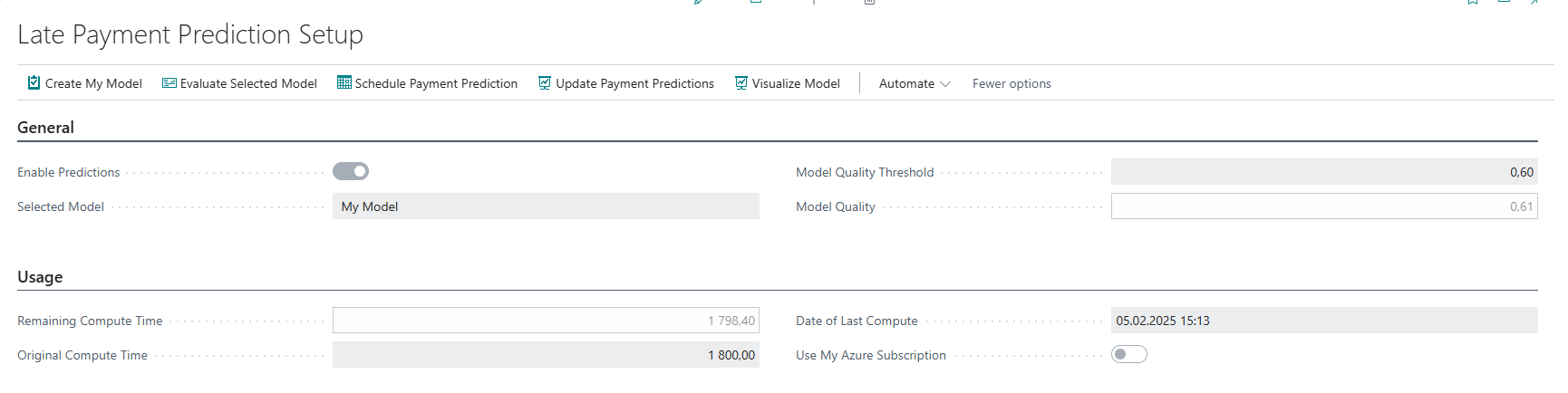
The data required to train and evaluate the model is determined for each customer entry that has a related posted sales invoice that contains the following information:
-
Amount (LCY) Including Tax
-
Payment terms in days are counted as the due date minus the publication date
-
Whether a settled credit note exists or not
In addition, the record is supplemented with aggregated data from another invoice that relates to the same customer. This data includes the following parameters:
-
Total number and number of paid invoices
-
Total number and number of invoices that were paid late
-
Total number and number of unpaid invoices
-
Total number and number of unpaid invoices that are already overdue
-
Average number of days of delay
-
Ratio: Number of late/paid invoices paid
-
Ratio: Overdue Amount Paid / Invoices Paid
-
Ratio: Number of unpaid late/unpaid invoices
-
Ratio: Unpaid Amount Late/Unpaid Invoices
There are 2 types of models:
-
Standard- trained using data that is representative of many small and medium-sized enterprises.
-
My model - trained using my own data
The quality of the model is shown in the adjustment table. There is also the possibility to download a PDF schematic of this model.
Prediction view
-
In the role of centers - If the Sales Manager role is selected, the expected delayed invoices are in the Expected Delayed Sales Invoices pile

-
In customer ledger entries

-
Payment Prediction – according to the prediction, this column takes the values - Late and In time
-
Predictor reliability – Specifies the reliability of the late payment prediction. Deer is above 90%, medium is between 80 % and 90 %, and Low is less than 80%.
-
% Predictor Reliability - Specifies the % on which the confidence value is based. By default, this column is not displayed, but it can be added with the help of personalization.
Forecast update
-
Manually - by clicking Update Payment Prediction in Late Payment Settings
(LP: Machine Learning Setup (1950)or directly from the customer's list of items -
Automatically-
Job Queue Entry (472)- Codeunit1957 LPP Update -
As part of Sales Offers, there is an option to Predict Payments in promotions

Note: During testing, an error message "The value of 0.XXX cannot be evaluated for the Decimal type" appeared, which was associated with the Czech language setting. When changing the language to English, the error no longer occurs.